
Sign2Phone1.1.1 - App Store
You'll be able to see results in few seconds.
Publisher Description
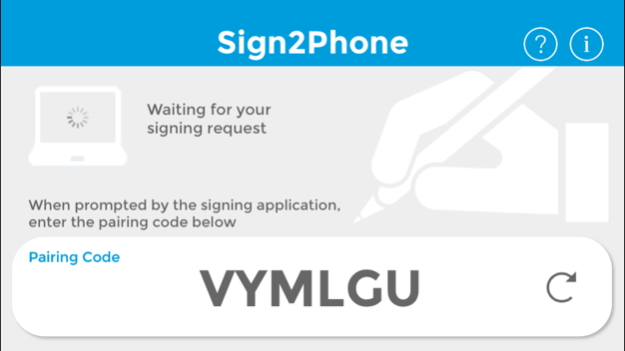
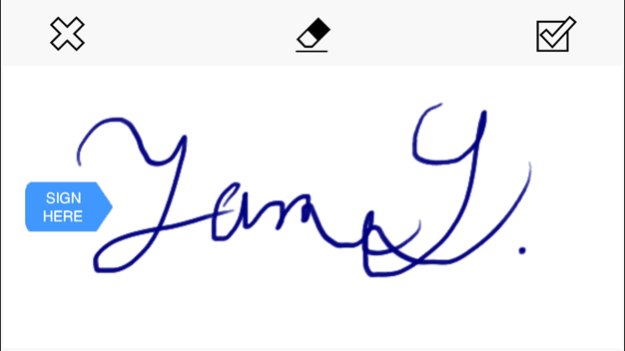
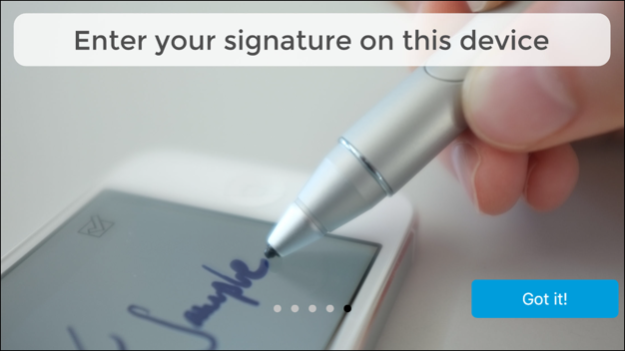
Sign2Phone - GENUINE ELECTRONIC SIGNATURES FOR MOBILE DEVICES
Bring Your Own Device - Business App for securely signing PDF documents
DESIGNED FOR BUSINESS-WORKFLOWS
Sign2Phone converts your mobile device into a simple handwritten signature capture device.
It is meant to be used exclusively in conjunction with SOFTPRO's secure signing products such as SignDoc Desktop.
The app enables you to:
- Use your mobile device to sign documents(pdf, tiff) with your handwritten signature.
- Capture signatures in a manner such that their integrity, and the integrity of signed documents can easily be verified by independent third parties (e.g. using the Adobe Reader)
- Sign documents using signatures that capture biometric characteristics uniquely identifying the signer.
- Bring your mobile device and use industry standard signing technologies.
USAGE / BASIC OPERATION
Sign2Phone is „paired“ with the desktop application via the local network.
You can download SignDoc Desktop at http://sp-l.de/cizy
Once you have installed SignDoc Desktop on your PC
- Download the App and open it.
Make sure that your mobile device and the PC running the SignDoc Desktop are on the same network.
- Prepare a document within SignDoc Desktop for signing.
- While the app is open, clicking on a signature field within the application will initiate a signature capture dialog in the app.
- The signature is captured and transmitted securely in real-time to the desktop application which places it in the document being signed.
SECURITY AND INTEGRITY
Documents signed using SignDoc Desktop do not just place an image of your signature in a document. Documents are signed adherent to the ISO/IEC 32000 digital signature standard. Documents signed in this manner can be easily verified for tampering using standard software such as the Adobe Reader®. The biometric data captured within a signature is adherent to the ISO/IEC 19794-7 standard.
Also, we have placed great importance on the visual quality of the signatures created by our app in order to make the electronic signing experience as close to signing on paper as possible. Try it and convince yourself of its signature quality
ENTERPRISE CAPABILITY
The SOFTPRO suite of software is designed such that it can be easily integrated in an enterprise document workflow. Please contact us at info@softpro.de if you are interested in using this product to streamline your business applications.
PRODUCT INFORMATION / SUPPORT / NEWS
http://www.softpro.de/en
info@softpro.de
http://facebook.com/softpro.de
Sep 18, 2017
Version 1.1.1
This app has been updated by Apple to display the Apple Watch app icon.
latest Wacom pens support via Bluetooth
bugfixes
About Sign2Phone
The company that develops Sign2Phone is SOFTPRO GmbH. The latest version released by its developer is 1.1.1.
To install Sign2Phone on your iOS device, just click the green Continue To App button above to start the installation process. The app is listed on our website since 2017-09-18 and was downloaded 0 times. We have already checked if the download link is safe, however for your own protection we recommend that you scan the downloaded app with your antivirus. Your antivirus may detect the Sign2Phone as malware if the download link is broken.
How to install Sign2Phone on your iOS device:
- Click on the Continue To App button on our website. This will redirect you to the App Store.
- Once the Sign2Phone is shown in the iTunes listing of your iOS device, you can start its download and installation. Tap on the GET button to the right of the app to start downloading it.
- If you are not logged-in the iOS appstore app, you'll be prompted for your your Apple ID and/or password.
- After Sign2Phone is downloaded, you'll see an INSTALL button to the right. Tap on it to start the actual installation of the iOS app.
- Once installation is finished you can tap on the OPEN button to start it. Its icon will also be added to your device home screen.
Program Details
System requirements
Download information
Pricing
Version History
version 1.1.1
posted on 2017-09-18
18 Sep 2017 Version 1.1.1
This app has been updated by Apple to use the latest Apple signing certificate.
latest Wacom pens support via Bluetooth
bugfixes
version 1.1.1
posted on 2017-09-18
Sep 18, 2017 Version 1.1.1
This app has been updated by Apple to use the latest Apple signing certificate.
latest Wacom pens support via Bluetooth
bugfixes
version 1.1.1
posted on 2017-09-18
Sep 18, 2017 Version 1.1.1
latest Wacom pens support via Bluetooth
bugfixes
version 1.1.1
posted on 2017-09-18
Sep 18, 2017 Version 1.1.1
This app has been updated by Apple to display the Apple Watch app icon.
latest Wacom pens support via Bluetooth
bugfixes
version 1.1.0
posted on 2013-06-20
version 1.1.1
posted on 1970-01-01
2017年9月18日 Version 1.1.1
This app has been updated by Apple to use the latest Apple signing certificate.
latest Wacom pens support via Bluetooth
bugfixes
version 1.1.1
posted on 1970-01-01
18 сент. 2017 г. Version 1.1.1
latest Wacom pens support via Bluetooth
bugfixes
Disclaimer
Official App Store Link
We do not host Sign2Phone on our servers. We did not scan it for viruses, adware, spyware or other type of malware. This app is hosted by Apple and passed their terms and conditions to be listed there. We recommend caution when installing it.
The App Store link for Sign2Phone is provided to you by apps112.com without any warranties, representations or guarantees of any kind, so access it at your own risk.
If you have questions regarding this particular app contact the publisher directly. For questions about the functionalities of apps112.com contact us.
